ASCII table
All 128 ASCII characters with their codes in decimal, hex, binary and octal, and the HTML entity for each printable one. Control characters are listed by their abbreviation and name. Search for a character, a code or a name, and select a row to see its bits. Codes 128 to 255 are in extended ASCII below.
| Dec | Hex | Binary | Oct | Char | HTML | Name |
|---|---|---|---|---|---|---|
| 0 | 00 | 0000000 | 000 | null | ||
| 1 | 01 | 0000001 | 001 | start of heading | ||
| 2 | 02 | 0000010 | 002 | start of text | ||
| 3 | 03 | 0000011 | 003 | end of text | ||
| 4 | 04 | 0000100 | 004 | end of transmission | ||
| 5 | 05 | 0000101 | 005 | enquiry | ||
| 6 | 06 | 0000110 | 006 | acknowledge | ||
| 7 | 07 | 0000111 | 007 | bell | ||
| 8 | 08 | 0001000 | 010 | backspace | ||
| 9 | 09 | 0001001 | 011 | 	 | horizontal tab | |
| 10 | 0A | 0001010 | 012 | | line feed | |
| 11 | 0B | 0001011 | 013 | vertical tab | ||
| 12 | 0C | 0001100 | 014 | form feed | ||
| 13 | 0D | 0001101 | 015 | carriage return | ||
| 14 | 0E | 0001110 | 016 | shift out | ||
| 15 | 0F | 0001111 | 017 | shift in | ||
| 16 | 10 | 0010000 | 020 | data link escape | ||
| 17 | 11 | 0010001 | 021 | device control 1 | ||
| 18 | 12 | 0010010 | 022 | device control 2 | ||
| 19 | 13 | 0010011 | 023 | device control 3 | ||
| 20 | 14 | 0010100 | 024 | device control 4 | ||
| 21 | 15 | 0010101 | 025 | negative acknowledge | ||
| 22 | 16 | 0010110 | 026 | synchronous idle | ||
| 23 | 17 | 0010111 | 027 | end of transmission block | ||
| 24 | 18 | 0011000 | 030 | cancel | ||
| 25 | 19 | 0011001 | 031 | end of medium | ||
| 26 | 1A | 0011010 | 032 | substitute | ||
| 27 | 1B | 0011011 | 033 | escape | ||
| 28 | 1C | 0011100 | 034 | file separator | ||
| 29 | 1D | 0011101 | 035 | group separator | ||
| 30 | 1E | 0011110 | 036 | record separator | ||
| 31 | 1F | 0011111 | 037 | unit separator | ||
| 32 | 20 | 0100000 | 040 |   | space | |
| 33 | 21 | 0100001 | 041 | !! | exclamation mark | |
| 34 | 22 | 0100010 | 042 | "" | double quotation mark | |
| 35 | 23 | 0100011 | 043 | ## | number sign, hash | |
| 36 | 24 | 0100100 | 044 | $$ | dollar sign | |
| 37 | 25 | 0100101 | 045 | %% | percent sign | |
| 38 | 26 | 0100110 | 046 | && | ampersand | |
| 39 | 27 | 0100111 | 047 | '' | apostrophe, single quote | |
| 40 | 28 | 0101000 | 050 | (( | left parenthesis | |
| 41 | 29 | 0101001 | 051 | )) | right parenthesis | |
| 42 | 2A | 0101010 | 052 | ** | asterisk | |
| 43 | 2B | 0101011 | 053 | ++ | plus sign | |
| 44 | 2C | 0101100 | 054 | ,, | comma | |
| 45 | 2D | 0101101 | 055 | - | hyphen, minus | |
| 46 | 2E | 0101110 | 056 | .. | full stop, period | |
| 47 | 2F | 0101111 | 057 | // | slash | |
| 48 | 30 | 0110000 | 060 | 0 | digit 0 | |
| 49 | 31 | 0110001 | 061 | 1 | digit 1 | |
| 50 | 32 | 0110010 | 062 | 2 | digit 2 | |
| 51 | 33 | 0110011 | 063 | 3 | digit 3 | |
| 52 | 34 | 0110100 | 064 | 4 | digit 4 | |
| 53 | 35 | 0110101 | 065 | 5 | digit 5 | |
| 54 | 36 | 0110110 | 066 | 6 | digit 6 | |
| 55 | 37 | 0110111 | 067 | 7 | digit 7 | |
| 56 | 38 | 0111000 | 070 | 8 | digit 8 | |
| 57 | 39 | 0111001 | 071 | 9 | digit 9 | |
| 58 | 3A | 0111010 | 072 | :: | colon | |
| 59 | 3B | 0111011 | 073 | ;; | semicolon | |
| 60 | 3C | 0111100 | 074 | << | less-than sign | |
| 61 | 3D | 0111101 | 075 | == | equals sign | |
| 62 | 3E | 0111110 | 076 | >> | greater-than sign | |
| 63 | 3F | 0111111 | 077 | ?? | question mark | |
| 64 | 40 | 1000000 | 100 | @@ | at sign | |
| 65 | 41 | 1000001 | 101 | A | capital A | |
| 66 | 42 | 1000010 | 102 | B | capital B | |
| 67 | 43 | 1000011 | 103 | C | capital C | |
| 68 | 44 | 1000100 | 104 | D | capital D | |
| 69 | 45 | 1000101 | 105 | E | capital E | |
| 70 | 46 | 1000110 | 106 | F | capital F | |
| 71 | 47 | 1000111 | 107 | G | capital G | |
| 72 | 48 | 1001000 | 110 | H | capital H | |
| 73 | 49 | 1001001 | 111 | I | capital I | |
| 74 | 4A | 1001010 | 112 | J | capital J | |
| 75 | 4B | 1001011 | 113 | K | capital K | |
| 76 | 4C | 1001100 | 114 | L | capital L | |
| 77 | 4D | 1001101 | 115 | M | capital M | |
| 78 | 4E | 1001110 | 116 | N | capital N | |
| 79 | 4F | 1001111 | 117 | O | capital O | |
| 80 | 50 | 1010000 | 120 | P | capital P | |
| 81 | 51 | 1010001 | 121 | Q | capital Q | |
| 82 | 52 | 1010010 | 122 | R | capital R | |
| 83 | 53 | 1010011 | 123 | S | capital S | |
| 84 | 54 | 1010100 | 124 | T | capital T | |
| 85 | 55 | 1010101 | 125 | U | capital U | |
| 86 | 56 | 1010110 | 126 | V | capital V | |
| 87 | 57 | 1010111 | 127 | W | capital W | |
| 88 | 58 | 1011000 | 130 | X | capital X | |
| 89 | 59 | 1011001 | 131 | Y | capital Y | |
| 90 | 5A | 1011010 | 132 | Z | capital Z | |
| 91 | 5B | 1011011 | 133 | [[ | left square bracket | |
| 92 | 5C | 1011100 | 134 | \\ | backslash | |
| 93 | 5D | 1011101 | 135 | ]] | right square bracket | |
| 94 | 5E | 1011110 | 136 | ^^ | caret, circumflex | |
| 95 | 5F | 1011111 | 137 | __ | underscore | |
| 96 | 60 | 1100000 | 140 | `` | grave accent, backtick | |
| 97 | 61 | 1100001 | 141 | a | small a | |
| 98 | 62 | 1100010 | 142 | b | small b | |
| 99 | 63 | 1100011 | 143 | c | small c | |
| 100 | 64 | 1100100 | 144 | d | small d | |
| 101 | 65 | 1100101 | 145 | e | small e | |
| 102 | 66 | 1100110 | 146 | f | small f | |
| 103 | 67 | 1100111 | 147 | g | small g | |
| 104 | 68 | 1101000 | 150 | h | small h | |
| 105 | 69 | 1101001 | 151 | i | small i | |
| 106 | 6A | 1101010 | 152 | j | small j | |
| 107 | 6B | 1101011 | 153 | k | small k | |
| 108 | 6C | 1101100 | 154 | l | small l | |
| 109 | 6D | 1101101 | 155 | m | small m | |
| 110 | 6E | 1101110 | 156 | n | small n | |
| 111 | 6F | 1101111 | 157 | o | small o | |
| 112 | 70 | 1110000 | 160 | p | small p | |
| 113 | 71 | 1110001 | 161 | q | small q | |
| 114 | 72 | 1110010 | 162 | r | small r | |
| 115 | 73 | 1110011 | 163 | s | small s | |
| 116 | 74 | 1110100 | 164 | t | small t | |
| 117 | 75 | 1110101 | 165 | u | small u | |
| 118 | 76 | 1110110 | 166 | v | small v | |
| 119 | 77 | 1110111 | 167 | w | small w | |
| 120 | 78 | 1111000 | 170 | x | small x | |
| 121 | 79 | 1111001 | 171 | y | small y | |
| 122 | 7A | 1111010 | 172 | z | small z | |
| 123 | 7B | 1111011 | 173 | {{ | left curly brace | |
| 124 | 7C | 1111100 | 174 | || | vertical bar, pipe | |
| 125 | 7D | 1111101 | 175 | }} | right curly brace | |
| 126 | 7E | 1111110 | 176 | ~ | tilde | |
| 127 | 7F | 1111111 | 177 | delete |
Binary is shown in the 7 bits ASCII uses; stored in a byte it has an extra 0 in front. The HTML column gives the numeric reference, which works for any character, and the named one where HTML has it (30 of the printable characters). Only & < > " ' also work in XML. To turn a whole message into binary, use the binary translator.
What ASCII is
ASCII, the American Standard Code for Information Interchange, was published in 1963 so that teleprinters and computers from different makers could exchange text. It gives a number from 0 to 127 to each of the English letters in both cases, the ten digits, punctuation, the space and 33 control codes that tell a device what to do rather than what to print. 128 codes fit exactly in 7 bits.
A code like this is what turns bits into text: the byte 01000001 means nothing until a code says it is A. The lesson how bits become letters, colours and codes starts from there.
How the table is laid out
The order is not arbitrary. The top two of the seven bits split the table into four blocks of 32, and the bottom five bits pick a character within the block.
| Top bits | Codes | Contains |
|---|---|---|
| 00xxxxx | 0 to 31 | Control codes |
| 01xxxxx | 32 to 63 | Space, punctuation and the digits |
| 10xxxxx | 64 to 95 | @, the capital letters and [ \ ] ^ _ |
| 11xxxxx | 96 to 127 | `, the small letters, { | } ~ and DEL |
Why A is 65 and a is 97
Capitals sit in the third block and small letters in the fourth, at the same place, so a letter and its other case are exactly 32 apart. In binary that is a single bit:
| A | 65 | 1 | 0 | 0 | 0 | 0 | 0 | 1 |
|---|---|---|---|---|---|---|---|---|
| a | 97 | 1 | 1 | 0 | 0 | 0 | 0 | 1 |
The highlighted bit is worth 32. Setting it makes a letter small, clearing it makes it a capital, and ignoring it compares letters without regard to case. The last five bits are the letter's place in the alphabet: A and a are 1, Z and z are 26.
Digits: the low four bits are the value
The digits 0 to 9 are codes 48 to 57, which is 011 followed by the digit in four bits. Clearing the top bits turns the character into its value, and those four bits are exactly the digit's BCD code.
| Char | 0 | 1 | 2 | 3 | 4 | 5 | 6 | 7 | 8 | 9 |
|---|---|---|---|---|---|---|---|---|---|---|
| Dec | 48 | 49 | 50 | 51 | 52 | 53 | 54 | 55 | 56 | 57 |
| Hex | 30 | 31 | 32 | 33 | 34 | 35 | 36 | 37 | 38 | 39 |
| Low 4 bits | 0000 | 0001 | 0010 | 0011 | 0100 | 0101 | 0110 | 0111 | 1000 | 1001 |
Printable ASCII chart
All 128 codes on one sheet in the classic four blocks of 32, with decimal, hex and binary, for printing or keeping beside the keyboard.
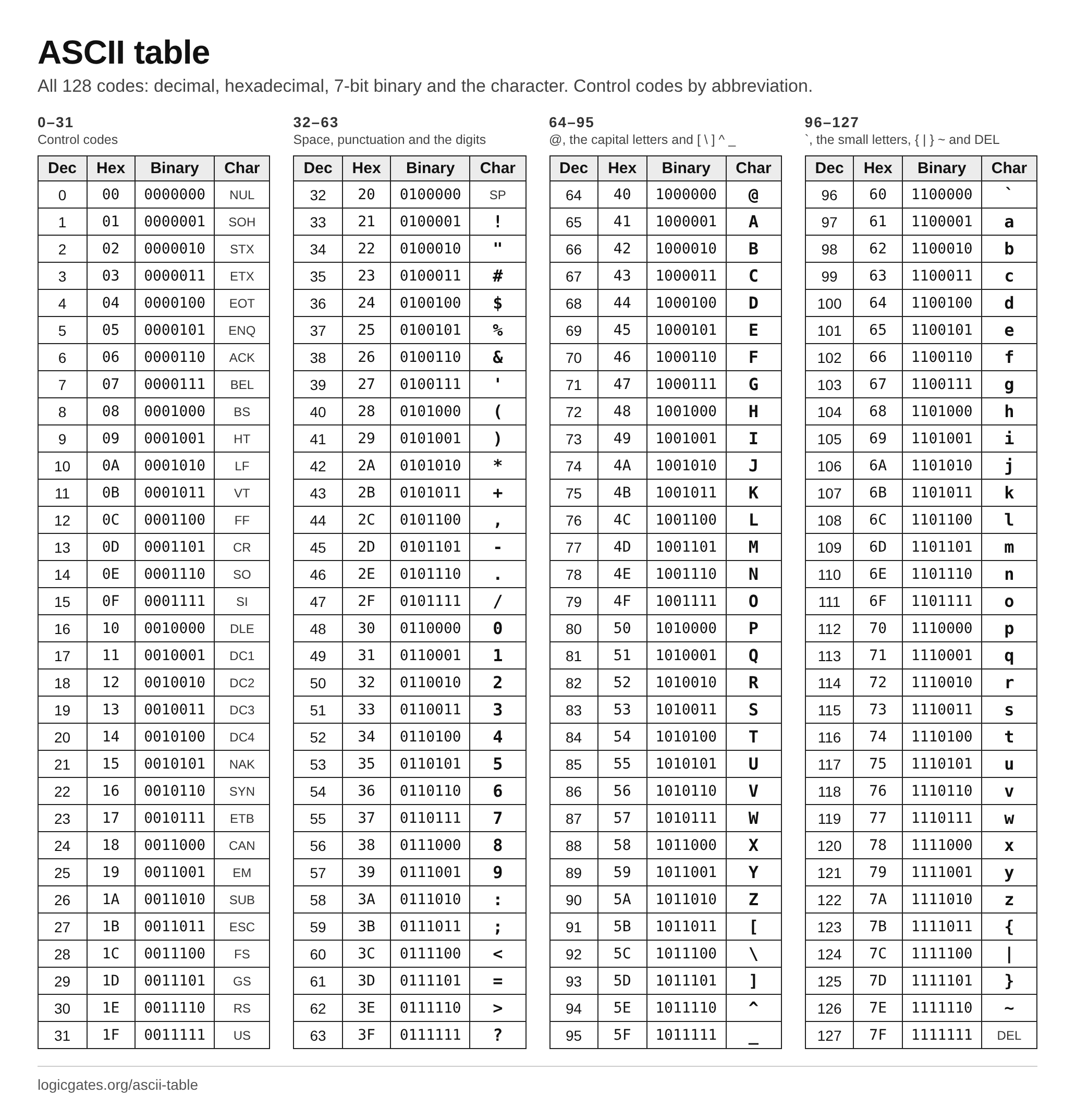 Click to download: ASCII table chart
Control characters
Codes 0 to 31 and 127 are not printed. They were written for teleprinters and data links, and a few are in daily use: tab, line feed, carriage return and escape. Codes 0 to 31 can each be typed as Ctrl plus the character 64 codes higher: J is 74, so Ctrl+J gives 10, LF, which is where the caret notation ^J comes from. DEL (127) is the exception: it is written ^?, because ? (63) is 64 below it.
| Dec | Hex | Abbr | Caret | Name and use |
|---|---|---|---|---|
| 0 | 00 | NUL | ^@\0 | null. Does nothing. C and many languages use it to mark the end of a string. |
| 1 | 01 | SOH | ^A | start of heading. Marked the start of a message header in early data links. |
| 2 | 02 | STX | ^B | start of text. Marked where the header ended and the message text began. |
| 3 | 03 | ETX | ^C | end of text. Ended the message text. Ctrl+C sends it, which is why Ctrl+C interrupts a program. |
| 4 | 04 | EOT | ^D | end of transmission. Ended a transmission. Ctrl+D sends it, which ends input in a Unix terminal. |
| 5 | 05 | ENQ | ^E | enquiry. Asked the other end to identify itself or report its status. |
| 6 | 06 | ACK | ^F | acknowledge. Confirmed that a message arrived intact. |
| 7 | 07 | BEL | ^G\a | bell. Rang the bell on a teleprinter; terminals beep or flash. |
| 8 | 08 | BS | ^H\b | backspace. Moves the cursor back one position. |
| 9 | 09 | HT | ^I\t | horizontal tab. The tab character, moving to the next tab stop. |
| 10 | 0A | LF | ^J\n | line feed. Moves down one line. Unix, Linux and macOS end each line of text with it. |
| 11 | 0B | VT | ^K\v | vertical tab. Moved down to the next vertical tab stop on a printer. |
| 12 | 0C | FF | ^L\f | form feed. Moved a printer to the top of the next page. |
| 13 | 0D | CR | ^M\r | carriage return. Moves back to the start of the line. Windows ends lines with CR then LF. |
| 14 | 0E | SO | ^N | shift out. Switched to an alternative character set. |
| 15 | 0F | SI | ^O | shift in. Switched back to the standard character set. |
| 16 | 10 | DLE | ^P | data link escape. Made the next characters be read as data rather than control codes. |
| 17 | 11 | DC1 | ^Q | device control 1. Known as XON: tells the sender to resume. Ctrl+Q in a terminal. |
| 18 | 12 | DC2 | ^R | device control 2. A control code left for devices to define. |
| 19 | 13 | DC3 | ^S | device control 3. Known as XOFF: tells the sender to pause. Ctrl+S in a terminal. |
| 20 | 14 | DC4 | ^T | device control 4. A control code left for devices to define. |
| 21 | 15 | NAK | ^U | negative acknowledge. Reported that a message arrived damaged, asking for it again. |
| 22 | 16 | SYN | ^V | synchronous idle. Sent when there was nothing else, to keep a synchronous link in step. |
| 23 | 17 | ETB | ^W | end of transmission block. Ended one block of a longer transmission. |
| 24 | 18 | CAN | ^X | cancel. Said that the data just sent was in error and should be ignored. |
| 25 | 19 | EM | ^Y | end of medium. Marked the physical end of a tape or card deck. |
| 26 | 1A | SUB | ^Z | substitute. Stands in for a character that was invalid. Ctrl+Z, end of file in old DOS text. |
| 27 | 1B | ESC | ^[\e | escape. Starts an escape sequence, how terminals are told to move the cursor or change colour. |
| 28 | 1C | FS | ^\ | file separator. The largest of four separators for structured data. |
| 29 | 1D | GS | ^] | group separator. Separates groups within a file. |
| 30 | 1E | RS | ^^ | record separator. Separates records within a group. |
| 31 | 1F | US | ^_ | unit separator. Separates fields within a record, the smallest unit. |
| 127 | 7F | DEL | ^? | delete. All seven holes punched: on paper tape it erased whatever character had been there. |
ASCII and Unicode
ASCII covers English and nothing more. Unicode gives a number, its code point, to every character in every writing system, and it starts with ASCII: A is U+0041, which is 65, in both. UTF-8, the encoding nearly every web page and file uses today, stores those first 128 as the same single bytes, so any ASCII text is already UTF-8.
Characters past 127 take two to four bytes in UTF-8. é is U+00E9, stored as 11000011 10101001. The binary translator shows this breakdown for any text, and Base64 is how those bytes are written when only ASCII characters can be sent.
Extended ASCII
ASCII uses 7 bits, and computers store 8, which leaves codes 128 to 255 free. Many character sets filled them, and all of them are loosely called extended ASCII, but there was never one standard. ISO 8859-1 (Latin-1) and Windows-1252 put accented letters there, so 233 is é; the original IBM PC's code page 437 put box-drawing characters and Greek letters there, so 233 is Θ. A file written with one and read with another comes out garbled. That mess is what Unicode ended; in UTF-8, bytes above 127 only ever appear as parts of multi-byte characters.
Here are codes 128 to 255 in the two sets most often meant. Windows-1252 is what Windows used for English and Western European text, and what browsers assume when a page says it is Latin-1; its column is decoded by the browser's own decoder. It leaves 5 codes unused (81, 8D, 8F, 90, 9D). Code page 437 is the IBM PC's set, still seen in DOS programs and box-drawn text.
| Dec | Hex | Binary | Windows-1252 | CP437 |
|---|---|---|---|---|
| 128 | 80 | 10000000 | € | Ç |
| 129 | 81 | 10000001 | unused | ü |
| 130 | 82 | 10000010 | ‚ | é |
| 131 | 83 | 10000011 | ƒ | â |
| 132 | 84 | 10000100 | „ | ä |
| 133 | 85 | 10000101 | … | à |
| 134 | 86 | 10000110 | † | å |
| 135 | 87 | 10000111 | ‡ | ç |
| 136 | 88 | 10001000 | ˆ | ê |
| 137 | 89 | 10001001 | ‰ | ë |
| 138 | 8A | 10001010 | Š | è |
| 139 | 8B | 10001011 | ‹ | ï |
| 140 | 8C | 10001100 | Œ | î |
| 141 | 8D | 10001101 | unused | ì |
| 142 | 8E | 10001110 | Ž | Ä |
| 143 | 8F | 10001111 | unused | Å |
| 144 | 90 | 10010000 | unused | É |
| 145 | 91 | 10010001 | ‘ | æ |
| 146 | 92 | 10010010 | ’ | Æ |
| 147 | 93 | 10010011 | “ | ô |
| 148 | 94 | 10010100 | ” | ö |
| 149 | 95 | 10010101 | • | ò |
| 150 | 96 | 10010110 | – | û |
| 151 | 97 | 10010111 | — | ù |
| 152 | 98 | 10011000 | ˜ | ÿ |
| 153 | 99 | 10011001 | ™ | Ö |
| 154 | 9A | 10011010 | š | Ü |
| 155 | 9B | 10011011 | › | ¢ |
| 156 | 9C | 10011100 | œ | £ |
| 157 | 9D | 10011101 | unused | ¥ |
| 158 | 9E | 10011110 | ž | ₧ |
| 159 | 9F | 10011111 | Ÿ | ƒ |
| 160 | A0 | 10100000 | NBSP | á |
| 161 | A1 | 10100001 | ¡ | í |
| 162 | A2 | 10100010 | ¢ | ó |
| 163 | A3 | 10100011 | £ | ú |
| 164 | A4 | 10100100 | ¤ | ñ |
| 165 | A5 | 10100101 | ¥ | Ñ |
| 166 | A6 | 10100110 | ¦ | ª |
| 167 | A7 | 10100111 | § | º |
| 168 | A8 | 10101000 | ¨ | ¿ |
| 169 | A9 | 10101001 | © | ⌐ |
| 170 | AA | 10101010 | ª | ¬ |
| 171 | AB | 10101011 | « | ½ |
| 172 | AC | 10101100 | ¬ | ¼ |
| 173 | AD | 10101101 | SHY | ¡ |
| 174 | AE | 10101110 | ® | « |
| 175 | AF | 10101111 | ¯ | » |
| 176 | B0 | 10110000 | ° | ░ |
| 177 | B1 | 10110001 | ± | ▒ |
| 178 | B2 | 10110010 | ² | ▓ |
| 179 | B3 | 10110011 | ³ | │ |
| 180 | B4 | 10110100 | ´ | ┤ |
| 181 | B5 | 10110101 | µ | ╡ |
| 182 | B6 | 10110110 | ¶ | ╢ |
| 183 | B7 | 10110111 | · | ╖ |
| 184 | B8 | 10111000 | ¸ | ╕ |
| 185 | B9 | 10111001 | ¹ | ╣ |
| 186 | BA | 10111010 | º | ║ |
| 187 | BB | 10111011 | » | ╗ |
| 188 | BC | 10111100 | ¼ | ╝ |
| 189 | BD | 10111101 | ½ | ╜ |
| 190 | BE | 10111110 | ¾ | ╛ |
| 191 | BF | 10111111 | ¿ | ┐ |
| 192 | C0 | 11000000 | À | └ |
| 193 | C1 | 11000001 | Á | ┴ |
| 194 | C2 | 11000010 | Â | ┬ |
| 195 | C3 | 11000011 | Ã | ├ |
| 196 | C4 | 11000100 | Ä | ─ |
| 197 | C5 | 11000101 | Å | ┼ |
| 198 | C6 | 11000110 | Æ | ╞ |
| 199 | C7 | 11000111 | Ç | ╟ |
| 200 | C8 | 11001000 | È | ╚ |
| 201 | C9 | 11001001 | É | ╔ |
| 202 | CA | 11001010 | Ê | ╩ |
| 203 | CB | 11001011 | Ë | ╦ |
| 204 | CC | 11001100 | Ì | ╠ |
| 205 | CD | 11001101 | Í | ═ |
| 206 | CE | 11001110 | Î | ╬ |
| 207 | CF | 11001111 | Ï | ╧ |
| 208 | D0 | 11010000 | Ð | ╨ |
| 209 | D1 | 11010001 | Ñ | ╤ |
| 210 | D2 | 11010010 | Ò | ╥ |
| 211 | D3 | 11010011 | Ó | ╙ |
| 212 | D4 | 11010100 | Ô | ╘ |
| 213 | D5 | 11010101 | Õ | ╒ |
| 214 | D6 | 11010110 | Ö | ╓ |
| 215 | D7 | 11010111 | × | ╫ |
| 216 | D8 | 11011000 | Ø | ╪ |
| 217 | D9 | 11011001 | Ù | ┘ |
| 218 | DA | 11011010 | Ú | ┌ |
| 219 | DB | 11011011 | Û | █ |
| 220 | DC | 11011100 | Ü | ▄ |
| 221 | DD | 11011101 | Ý | ▌ |
| 222 | DE | 11011110 | Þ | ▐ |
| 223 | DF | 11011111 | ß | ▀ |
| 224 | E0 | 11100000 | à | α |
| 225 | E1 | 11100001 | á | ß |
| 226 | E2 | 11100010 | â | Γ |
| 227 | E3 | 11100011 | ã | π |
| 228 | E4 | 11100100 | ä | Σ |
| 229 | E5 | 11100101 | å | σ |
| 230 | E6 | 11100110 | æ | µ |
| 231 | E7 | 11100111 | ç | τ |
| 232 | E8 | 11101000 | è | Φ |
| 233 | E9 | 11101001 | é | Θ |
| 234 | EA | 11101010 | ê | Ω |
| 235 | EB | 11101011 | ë | δ |
| 236 | EC | 11101100 | ì | ∞ |
| 237 | ED | 11101101 | í | φ |
| 238 | EE | 11101110 | î | ε |
| 239 | EF | 11101111 | ï | ∩ |
| 240 | F0 | 11110000 | ð | ≡ |
| 241 | F1 | 11110001 | ñ | ± |
| 242 | F2 | 11110010 | ò | ≥ |
| 243 | F3 | 11110011 | ó | ≤ |
| 244 | F4 | 11110100 | ô | ⌠ |
| 245 | F5 | 11110101 | õ | ⌡ |
| 246 | F6 | 11110110 | ö | ÷ |
| 247 | F7 | 11110111 | ÷ | ≈ |
| 248 | F8 | 11111000 | ø | ° |
| 249 | F9 | 11111001 | ù | ∙ |
| 250 | FA | 11111010 | ú | · |
| 251 | FB | 11111011 | û | √ |
| 252 | FC | 11111100 | ü | ⁿ |
| 253 | FD | 11111101 | ý | ² |
| 254 | FE | 11111110 | þ | ■ |
| 255 | FF | 11111111 | ÿ | NBSP |
NBSP is a no-break space and SHY a soft hyphen, both invisible. In UTF-8 none of these is one byte: é, 233 in Windows-1252, is stored as C3 A9.
Questions
What is the ASCII code for A?
Capital A is 65 in decimal, 41 in hex and 1000001 in binary. Small a is 97, 61 in hex. The capitals run from 65 to 90 and the small letters from 97 to 122, in alphabetical order.
How many characters are in ASCII?
128, numbered 0 to 127, because ASCII uses 7 bits and 2^7 is 128. 33 of them are control codes, which are not printed; the other 95 are the space, digits, letters and punctuation.
What is the difference between ASCII and Unicode?
ASCII has 128 characters, enough for English. Unicode numbers every character of every writing system, well over 100,000 of them, and its first 128 are ASCII with the same numbers. UTF-8, the usual way to store Unicode, stores those 128 as the same single bytes, so ASCII text is valid UTF-8.
Why is a 32 more than A?
So that changing case is a single bit. A is 1000001 and a is 1100001: they differ only in the bit worth 32. Old hardware could switch case, or ignore it when comparing, by setting or clearing that bit.
What are the characters 128 to 255?
They are not ASCII. ASCII stops at 127. Many 8-bit character sets, loosely called extended ASCII, used 128 to 255 for accented letters, box drawing and symbols, but each set used them differently, so the same byte could be é on one computer and something else on another. Unicode and UTF-8 replaced them.
What is the difference between LF and CR?
LF, line feed, is code 10 and moves down a line; CR, carriage return, is code 13 and moves back to the start of the line. They come from teleprinters, which needed both. Unix, Linux and macOS end a line of text with LF alone, Windows with CR followed by LF.