Binary translator
Turn text into binary, or binary back into text. Every character is broken down below into its number and the bytes UTF-8 stores it as, so you can see where each bit comes from.
Any text, including accents and emoji. It is encoded as UTF-8, which is ASCII for plain English letters.
Character by character
| Char | Code point | UTF-8 bytes in binary | Hex | Decimal |
|---|---|---|---|---|
| H | U+0048 | 01001000 | 48 | 72 |
| i | U+0069 | 01101001 | 69 | 105 |
How text becomes binary
A computer stores only numbers, and it stores them in binary. Text gets there in three steps.
- Each character gets a number. Unicode gives every character in every script a number called its code point, written U+ and then hex: H is U+0048, which is 72.
- The number becomes bytes. UTF-8, the encoding used by nearly every web page and file today, stores code points up to 127 as a single byte holding the number, and bigger ones as two to four bytes.
- Each byte is 8 bits. 72 in binary is 01001000, so that is what H is stored as.
The table of which number stands for which character is the code. For English letters, digits and punctuation it is ASCII, which UTF-8 contains unchanged. The lesson how bits become letters, colours and codes goes through the idea slowly.
Binary code for letters (binary alphabet)
Every letter and digit as the byte a computer stores, in ASCII and UTF-8 alike, with its decimal code. Capitals run from 65 to 90, small letters from 97 to 122, and the digits from 48 to 57. A space is 00100000 (32).
Capital letters
- A 01000001 65
- B 01000010 66
- C 01000011 67
- D 01000100 68
- E 01000101 69
- F 01000110 70
- G 01000111 71
- H 01001000 72
- I 01001001 73
- J 01001010 74
- K 01001011 75
- L 01001100 76
- M 01001101 77
- N 01001110 78
- O 01001111 79
- P 01010000 80
- Q 01010001 81
- R 01010010 82
- S 01010011 83
- T 01010100 84
- U 01010101 85
- V 01010110 86
- W 01010111 87
- X 01011000 88
- Y 01011001 89
- Z 01011010 90
Small letters
- a 01100001 97
- b 01100010 98
- c 01100011 99
- d 01100100 100
- e 01100101 101
- f 01100110 102
- g 01100111 103
- h 01101000 104
- i 01101001 105
- j 01101010 106
- k 01101011 107
- l 01101100 108
- m 01101101 109
- n 01101110 110
- o 01101111 111
- p 01110000 112
- q 01110001 113
- r 01110010 114
- s 01110011 115
- t 01110100 116
- u 01110101 117
- v 01110110 118
- w 01110111 119
- x 01111000 120
- y 01111001 121
- z 01111010 122
Digits
- 0 00110000 48
- 1 00110001 49
- 2 00110010 50
- 3 00110011 51
- 4 00110100 52
- 5 00110101 53
- 6 00110110 54
- 7 00110111 55
- 8 00111000 56
- 9 00111001 57
A capital and its small letter differ in one bit, the one worth 32: A is 01000001 and a is 01100001. The last five bits count through the alphabet, and a digit's last four bits are its value. Punctuation and control codes are in the ASCII table.
Printable binary alphabet chart
Every capital letter, small letter and digit with its 8-bit code and decimal value on one sheet, for printing or a worksheet.
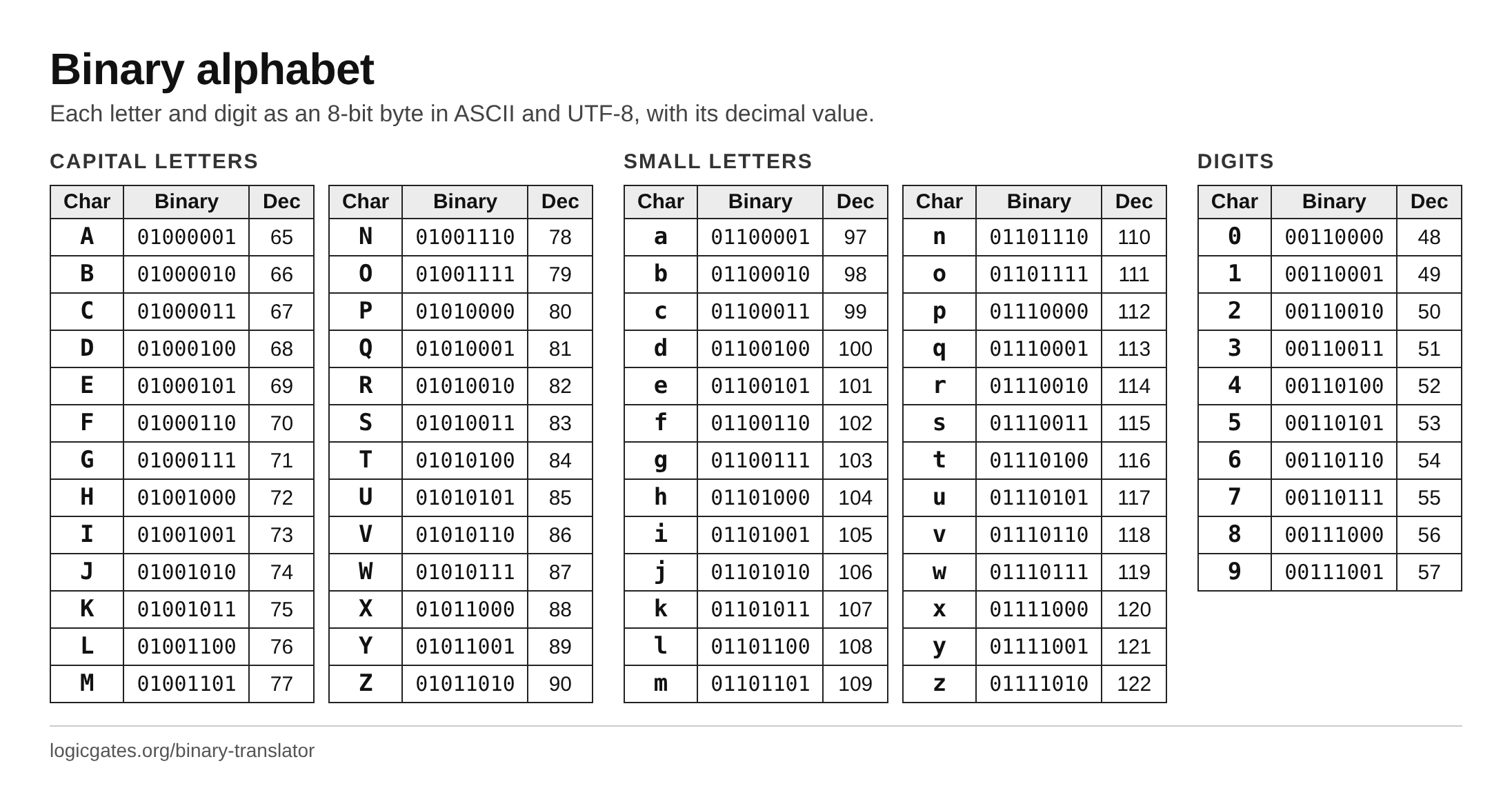 Click to download: Binary alphabet chart
ASCII and UTF-8: why é is two bytes
ASCII has 128 characters, numbered 0 to 127, which fit in 7 bits. That covers English and nothing else. Unicode numbers over a million possible characters, so UTF-8 uses more bytes for bigger numbers, and marks the bytes so a reader always knows where a character starts.
| Bytes | Code points | Bits for the number | Pattern |
|---|---|---|---|
| 1 | U+0000 to U+007F | 7 | 0xxxxxxx |
| 2 | U+0080 to U+07FF | 11 | 110xxxxx 10xxxxxx |
| 3 | U+0800 to U+FFFF | 16 | 1110xxxx 10xxxxxx 10xxxxxx |
| 4 | U+10000 to U+10FFFF | 21 | 11110xxx 10xxxxxx 10xxxxxx 10xxxxxx |
The first bits of each byte are markers. A byte starting 0 is a whole character on its own, which is exactly ASCII, so any ASCII text is already valid UTF-8. A byte starting 110, 1110 or 11110 starts a character of two, three or four bytes, and each byte that follows starts 10. The x positions hold the code point's bits.
| Char | Code point | UTF-8 bytes in binary | Hex |
|---|---|---|---|
| A | U+0041 | 01000001 | 41 |
| é | U+00E9 | 1100001110101001 | C3 A9 |
| € | U+20AC | 111000101000001010101100 | E2 82 AC |
| 😀 | U+1F600 | 11110000100111111001100010000000 | F0 9F 98 80 |
Marker bits in grey, the code point's bits in green. Joining the green bits of a row gives back the code point in binary. Some older systems used a single byte for é with a different code, which is why text sometimes shows up as "café": its two UTF-8 bytes were read as two separate characters.
Reading a byte with place values
Each bit of a byte has a weight, doubling from right to left: 1, 2, 4 up to 128. The byte's value is the sum of the weights where the bit is 1. Here is 01001000, the letter H:
| Weight | 128 | 64 | 32 | 16 | 8 | 4 | 2 | 1 |
|---|---|---|---|---|---|---|---|---|
| Bit | 0 | 1 | 0 | 0 | 1 | 0 | 0 | 0 |
The 1s sit under 64 and 8, so the byte is 64 + 8 = 72, and character 72 is H. The binary converter does the same for any number, and the lesson on bytes, hex and bit width explains why a byte is 8 bits and how hex shortens it.
How to translate binary to text by hand
- Split the bits into bytes of 8, counting from the left.
- Turn each byte into a number by adding the weights of its 1 bits.
- Look each number up in the ASCII table. A byte of 128 or more is part of a longer UTF-8 character; its first bits say how many bytes belong together.
Here is 01001100 01101111 01100111 01101001 01100011 worked that way:
| Byte | Weights of the 1 bits | Value | Char |
|---|---|---|---|
| 01001100 | 64 + 8 + 4 | 76 | L |
| 01101111 | 64 + 32 + 8 + 4 + 2 + 1 | 111 | o |
| 01100111 | 64 + 32 + 4 + 2 + 1 | 103 | g |
| 01101001 | 64 + 32 + 8 + 1 | 105 | i |
| 01100011 | 64 + 32 + 2 + 1 | 99 | c |
The message reads "Logic". A quicker way to spot letters: capitals are 010 followed by the letter's place in the alphabet in five bits, and small letters are 011 followed by the same. o is the 15th letter, so it is 011 and 01111. Load it into the translator.
Questions
What does 01001000 01101001 mean?
It is the word "Hi". Each group of 8 bits is one byte: 01001000 is 72, the code for H, and 01101001 is 105, the code for i. Paste it into the translator above with "Binary to text" selected to see each step.
Is binary code the same as ASCII?
No. Binary is just a way of writing numbers with two digits. ASCII is a code that says which number stands for which character, so A is 65, which is 01000001 in binary. Binary to text translation needs both: read each group of bits as a number, then look the number up in a code such as ASCII or UTF-8.
How many bits are in a letter?
Eight for the letters and symbols of ASCII, which UTF-8 stores in one byte each. ASCII itself needs only 7 bits, so the first bit is always 0. Other characters take more: é takes 16 bits, € takes 24 bits, 😀 takes 32 bits.
Why is é two bytes?
Its code point, U+00E9 (233), is bigger than 127, the largest number that fits in the 7 bits a one-byte UTF-8 character has room for. UTF-8 splits its bits over two bytes: 11000011 10101001. The first starts with 110 to say "two bytes", the second with 10 to say "continued".
Can I translate binary without spaces?
Yes. Without spaces the bits are read eight at a time from the left, so the total must be a multiple of 8. With spaces each group must be 8 bits. A message written entirely in 7-bit groups, as some older translators produce, is read as ASCII with a 0 added at the front of each group.
What is the binary code for a space?
A space is character 32, which is 00100000 in binary. It is a character like any other, so a translated sentence has a byte for every space between its words.
Why do I get an error for my binary?
Either a group is not 8 bits long, there is a character other than 0, 1 and spaces, or the bytes are not valid UTF-8: a byte above 127 must be part of a multi-byte character, so it has to follow the rules for one. The message names the group or byte where things went wrong.
Also on this site: the ASCII table with all 128 codes, and Base64 encoding, the other common way to write bytes as text.